
Your logs are full of Aadhaar numbers: a PII leak checklist for Indian apps
Users type personal information into every text box you give them. The text then flows into places nobody meant it to go. Here is a checklist for finding those places, and a way to close them before the text leaves the phone.
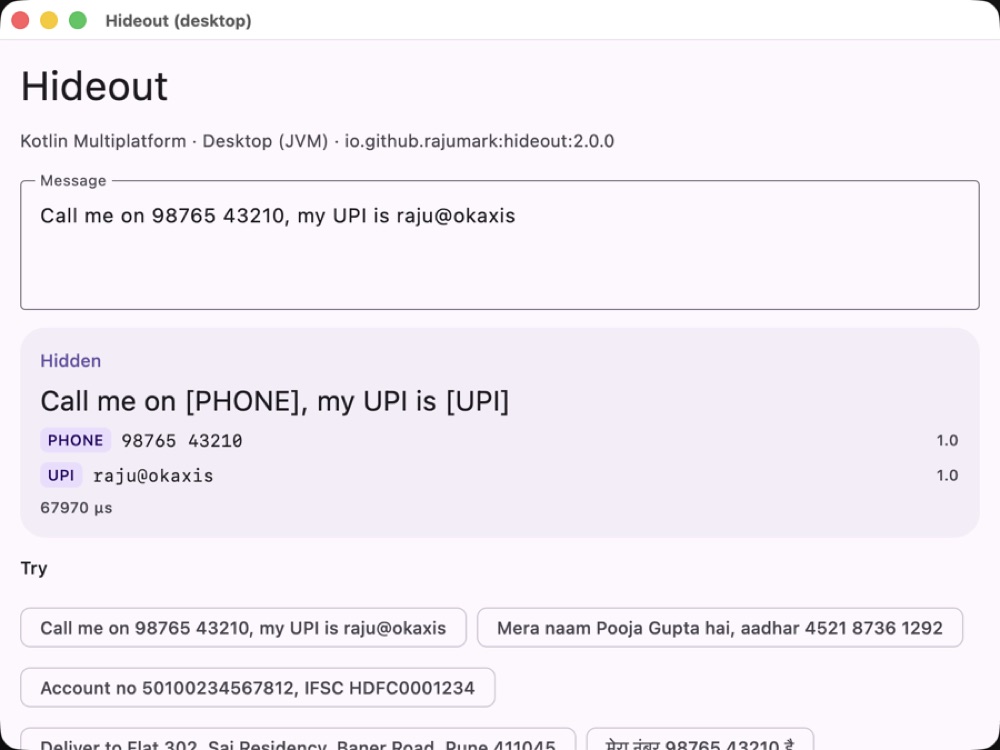
[PHONE], [UPI], [AADHAAR].The problem, in one message
“Call me on 98765 43210, my UPI is raju@okaxis” is a perfectly normal message. In a support chat it's helpful. The trouble starts afterwards, when that exact string is copied into a debug log, an analytics event, a crash report, a search index and, these days, a prompt sent to a cloud LLM.
Nobody decides to leak it. It just flows. And under India's Digital Personal Data Protection Act, “it just flowed” is not a comfortable position to be in.
The audit: where does user text go?
Walk through your app with this list. For each one, ask: could raw user text end up here?
- Debug and server logs. Especially request bodies and “temporary” logging that shipped.
- Analytics events. Search queries, form fields and “last message” properties.
- Crash and error reports. Exceptions that include the input that caused them.
- Support tickets and CRM notes. Read by many people, kept for years.
- Prompts to cloud AI APIs. Summaries, smart replies and “AI assist” features.
- Search indexes and caches. Personal data made searchable by accident.
- Shared screens. Screenshots in bug reports, screen sharing, message previews on a lock screen.
Every box you tick is a leak. The fix is the same for all of them: hide personal info before the text leaves the component that received it — ideally before it leaves the device.
What counts as personal info
Hideout detects 19 types, each with exact character offsets and a confidence score. The Indian ones are what make it different:
NAME PHONE EMAIL UPI AADHAAR PAN CARD BANK_ACCOUNT IFSC ADDRESS PASSPORT VOTER_ID DRIVING_LICENSE VEHICLE GOV_ID DOB SECRET USERNAME IP
SECRET covers passwords, OTPs, PINs and CVVs. Aadhaar is caught even when it's already masked as XXXX XXXX 1234. Addresses include the house, street, building and PIN code — but a city on its own is left alone.
What must not be hidden
This is the half most redaction tools get wrong. If you hide every number, your support team can't see the order ID and your logs become useless. Hideout leaves these visible on purpose: prices, times, order IDs, UPI transaction references, PNRs and cities.
| Input | After hide() |
|---|---|
| Call me on 98765 43210, my UPI is raju@okaxis | Call me on [PHONE], my UPI is [UPI] |
| Mera naam Pooja Gupta hai, aadhar 4521 8736 1292 | Mera naam [NAME] hai, aadhar [AADHAAR] |
| Account no 50100234567812, IFSC HDFC0001234 | Account no [BANK_ACCOUNT], IFSC [IFSC] |
| Order #40512378 will arrive by Friday, costs Rs 24,999 | Order #40512378 will arrive by Friday, costs Rs 24,999 (unchanged) |
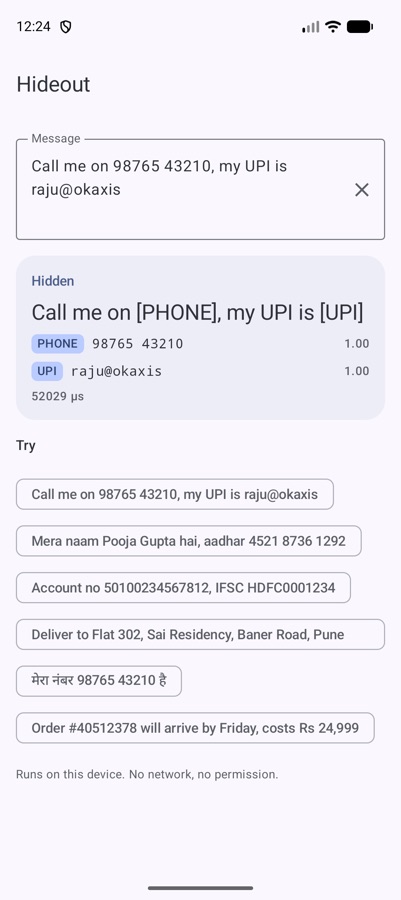
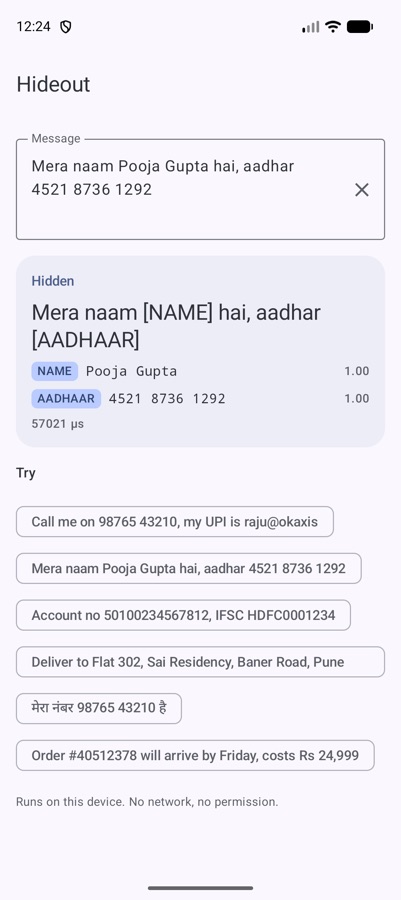
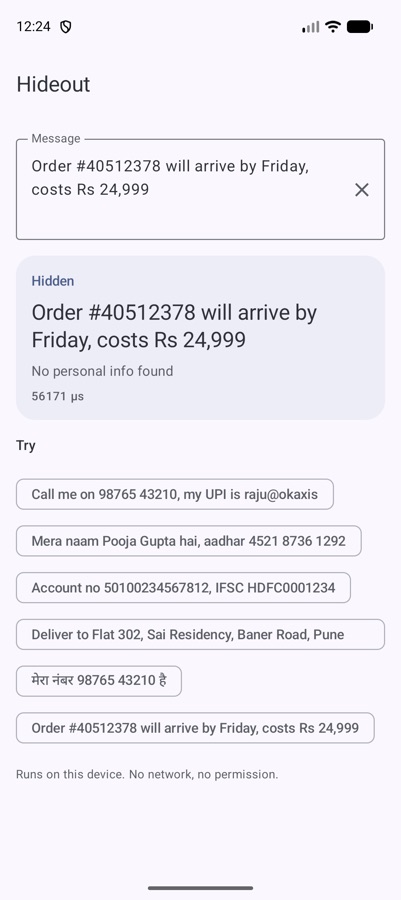
Closing each leak
Load it once and use it at every exit:
// build.gradle.kts
implementation("io.github.rajumark:hideout:2.0.0")

val hideout = Hideout()                          // load once, off the main thread

log.d("Support message: ${hideout.hide(text)}")   // logs
analytics.log("search", hideout.hide(query))      // analytics
llmApi.summarise(hideout.hide(chatHistory))       // cloud AI prompts

if (hideout.contains(draft, types = setOf(PiiType.SECRET))) {
    warn("Never share your OTP, even with us.")   // stop OTP scams at the source
}
Need something other than [TYPE]? Choose your own replacement, or only some types:
hideout.hide("OTP is 482913", replacement = { "*".repeat(it.text.length) })   // "OTP is ******"
hideout.hide("Call Rahul on 98765 43210", types = setOf(PiiType.PHONE))       // "Call Rahul on [PHONE]"
And when you need positions (to highlight, not replace), find() returns each item with offsets that work directly with String.substring.
Does it actually catch things?
Measured on hand-written chat messages in 14 languages, written after training and never used to build or tune the model:
| Hideout | Microsoft Presidio (Indian recognizers on) | GLiNER multi PII | |
|---|---|---|---|
| PII hidden | 96% | 64% | 42% |
| No-PII messages left alone | 95% | 40% | 90% |
| Exactly right | 90% | 37% | 47% |
| Indian chat (3,000 messages): PII hidden | 99% | 66% | 62% |
| Size | 8 MB | 445 MB | 1.1 GB |
| Latency, 1 CPU thread (laptop) | ~0.3 ms | ~10 ms | ~66 ms |
Known gaps (add these to your audit notes)
- A name right before a relation word is sometimes missed: “Hemant bhai”.
- A bare number after “at” can be taken for an address: “starts at 7”.
- Wi-Fi network names can be taken for passwords.
- A word next to a found item is sometimes swallowed into it.
- Chinese, Japanese and Thai are not supported.
The threshold parameter (default 0.5) is your dial: lower it to hide more and leak less, raise it to hide less.
Why on the device
A PII detector that runs on a server has already received the personal information it's supposed to protect. Hideout runs where the text is typed, with no network permission and no telemetry. The text you're protecting never has to go anywhere to be protected.
Print the checklist, walk your app, and put hide() at every exit you find.
The Hoverfly series. Eight small on-device models, one job each, all plain Kotlin Multiplatform with no native code. Each post is written differently, because each model taught me something different.
- Moji — emoji suggestions, told as a story
- Beacon — language detection, as a benchmark report
- Comma — punctuation restoration, as a step-by-step tutorial
- Comeback — smart replies, as an honest opinion piece
- Emotion — emotion detection, as questions and answers
- Gatekeeper — toxicity detection, as a practical playbook
- Hideout — personal info hiding, as an audit checklist (you are here)
- Chalk — doodle recognition, as an engineering deep dive